How do I track my repair status of my device?
Repair Status
If your device has been sent in for repair, you can track the status of this by selecting the Repair Service Tab and then Repair Status on the left hand side of the Mio Support page.
If your device has been sent in for repair, you can track the status of this by selecting the Repair Service Tab and then Repair Status on the left hand side of the Mio Support page.
Select to search a repair status either by your RMA number or by your product Serial Number. Enter in the number and select Search. The Shipment Tracking number is the Royal Mail tracking number.
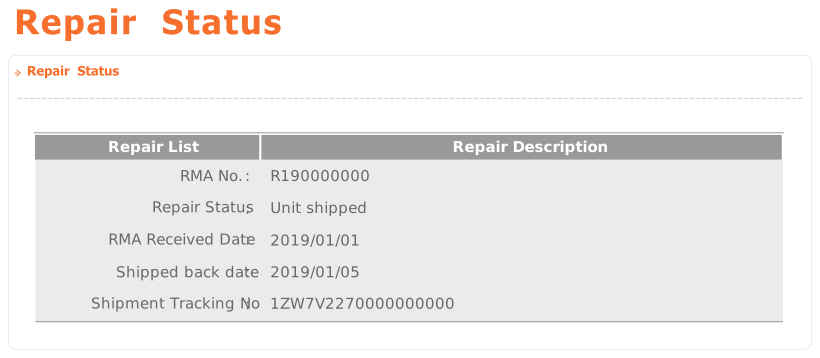
Tip: Your RMA number will always start with an R, followed by nine numbers.
Related Articles
Returning your MiVue Drive for repair
RepairIf you have been issued an RMA number and are returning your device for repair please note the following: Ensure your devices is packed securely, to prevent it from being damaged in transit. You must include a copy of the Proof of Purchase with ...Why a pause icon keep showing at my status bar?
In order not to miss any activity record, the default movement detection is on. Movement detection relies on GPS. If the device detects the movement by GPS, it will pop up a 10 seconds countdown to start a recording. If you haven't cancel it, your ...Can I buy maps for my device?
Can I buy maps for my device? You can buy new map updates or rental maps from the e-shop for our supported devices. To buy maps please go to: www.mio.com -> Select your Locale Setting -> Go to Maps -> And from here you an type or select your Mio ...Battery drains when device is not in use
Battery drained when device is not in use If you've not been using your device and the battery has run flat, it could be because your device is in standby mode. Once you complete your journey and disconnect the car charger, the following message will ...How to download Strava Routes to my device?
1. Make sure you have Strava Premium account* 2. Download MioShare app from App Store or Google Play 3. Make sure your already register your device to MioShare. Register your device by Settings > Device Management > Add 4. Link Strava account by ...